
Inventory Manager
Price range: $99.00 through $199.00
Improve inventory accuracy and streamline warehouse operations with Inventory Manager for Magento. Perform full inventory counts, zone-based cycle counts, receiving, and disposal workflows directly within Magento MSI.
Description
The Inventory Manager extension for Magento provides a structured and efficient workflow for performing physical inventory counts across warehouses, stockrooms, retail stores, and fulfillment locations. Built specifically for Magento Multi-Source Inventory (MSI), the extension helps merchants organize inventory counting operations, reduce stock discrepancies, and improve inventory accuracy with guided counting and reconciliation processes.
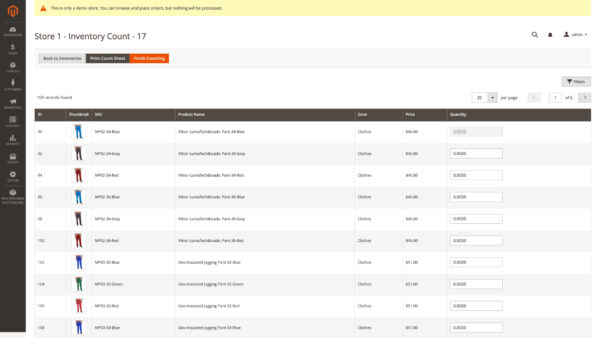
Inventory Manager supports multiple inventory workflows including full inventory counts, zone-based inventory counts, receiving operations, and disposal tracking. Staff can count inventory directly within the Magento admin using fast inline quantity entry, printable count sheets, and automated discrepancy comparison tools. The extension is ideal for merchants that need a reliable inventory counting process for periodic audits, warehouse cycle counts, incoming shipments, or damaged inventory adjustments.
For businesses managing large inventories or multiple storage areas, Inventory Manager also supports optional zone-based organization. Products can be grouped by warehouse sections, aisles, departments, shelves, or stockroom areas to streamline physical counting workflows and improve operational efficiency.
Features
- Supports Magento Multi-Source Inventory (MSI)
- Create full inventory counts for entire warehouse locations
- Perform zone-based inventory counts for specific warehouse areas
- Dedicated receiving inventory workflow for incoming stock
- Dedicated disposal workflow for damaged or expired products
- Structured multi-stage inventory counting process
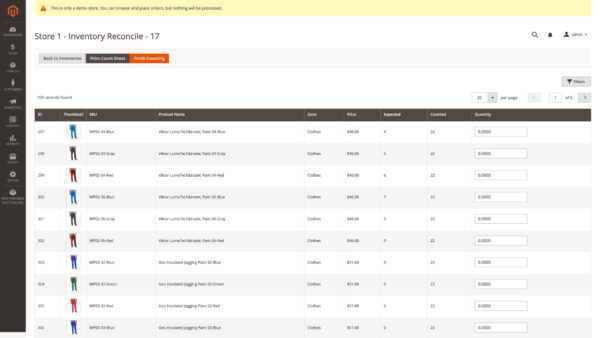
- Automated discrepancy comparison and reconciliation
- Inline AJAX quantity entry with immediate saving
- Resume inventory counts at any time without losing progress
- Printable inventory count sheets with grouped zone organization
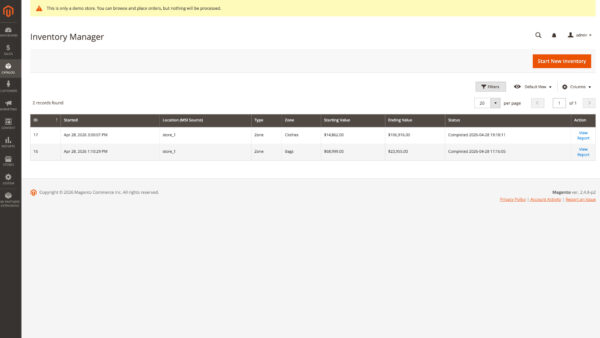
- Detailed inventory variance and shrinkage reporting
- Filter and sort products by SKU, product name, zone, and price
- Background processing for large inventory operations
- Supports warehouse, retail, and fulfillment workflows
- Optional integration support with location-based inventory extensions
Inventory Counting Workflows
Inventory Manager provides several inventory counting methods to support different operational needs.
Full Inventory Counts
Perform complete physical inventory counts across an entire MSI source location. This workflow is ideal for annual inventory audits, warehouse reconciliation, and complete stock verification processes.
Zone-Based Inventory Counts
Limit inventory counts to specific warehouse sections or physical storage areas. This approach helps large warehouses perform rolling cycle counts without disrupting operations across the entire facility.
Receiving Inventory
Quickly add incoming inventory quantities to existing stock levels during receiving operations. Receiving workflows bypass reconciliation stages to simplify stock intake procedures.
Disposal Inventory
Subtract damaged, expired, or unsellable inventory from existing stock quantities while maintaining accurate inventory records.
Streamlined Inventory Operations
The extension uses a guided workflow designed to improve inventory accuracy while simplifying counting operations for warehouse and retail staff.
Inventory sessions progress through multiple stages including initialization, counting, comparison, reconciliation, and final quantity updates. Background processing handles large data operations automatically while allowing staff to continue working efficiently within the Magento admin.
During the reconciliation stage, discrepancies between physical counts and existing inventory quantities are automatically identified for recounting. This helps merchants improve stock accuracy before inventory updates are finalized.
Printable Count Sheets
Generate professional printable count sheets directly from the Magento admin. Count sheets are optimized for warehouse and retail inventory operations and include:
- Inventory session information
- Warehouse or source details
- Zone grouping and organization
- Product SKUs and names
- Blank handwritten quantity fields
- Landscape print formatting for easier physical counting
Printable sheets are especially useful for facilities where inventory staff perform counts away from workstations or mobile devices.
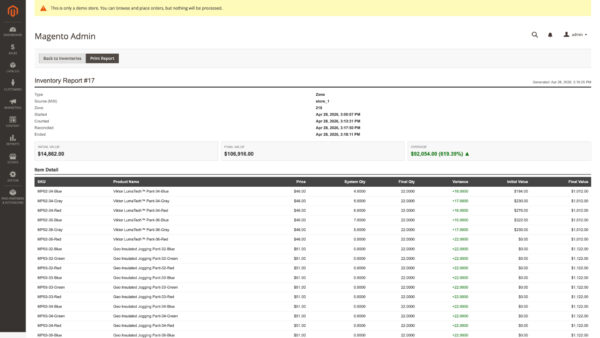
Detailed Reporting and Reconciliation
After inventory completion, Inventory Manager provides detailed reporting tools that help merchants review inventory performance and discrepancies.
Reports include:
- Beginning and final inventory values
- Inventory shrinkage totals
- Variance percentages
- Product-level quantity comparisons
- Inventory adjustment summaries
- Complete audit visibility for counting sessions
Benefits
- Improve physical inventory accuracy
- Reduce manual inventory counting errors
- Simplify warehouse and retail inventory audits
- Streamline receiving and disposal workflows
- Improve warehouse organization with zone-based counting
- Reduce time spent reconciling stock discrepancies
- Support scalable inventory operations across multiple locations
- Provide clearer inventory visibility for staff and managers
Compatibility
- Magento Open Source 2.4.x
- Adobe Commerce 2.4.x
- Magento Multi-Source Inventory (MSI)
- PHP 8.0, 8.1, 8.2, 8.3, and 8.4
Use Cases
- Warehouse inventory audits
- Retail store stock verification
- Cycle counting operations
- Receiving inventory processing
- Damaged inventory disposal tracking
- Multi-location inventory management
- Large catalog inventory reconciliation
Additional information
| Magento Edition | Magento Open Source, Adobe Commerce (cloud), Adobe Commerce (on-prem) |
|---|





Reviews
There are no reviews yet.